Installation de JBoss 5.1 Windows 7 64 bit
JBoss requires JDK 5 or 6. The JDK is not installed by default on a machine. Only the JRE is installed.
Installing a JDK 6 for Windows 7 64 bit
On the site http://developers.sun.com/downloads/ we choose the node of the Java SE download list and then click on Java SE ( JDK) 6.
Then I chose the JDK 6 update 18 and not the Development Kit Bundle.
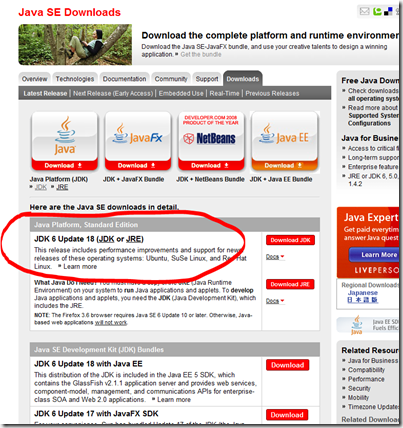
There is a specific installer for Windows 64 bits: jdk-6u18-windows-x64.exe.
It runs the exe file. The UAC seeks the acceptance of the amendments made by the program.
Personally, I deleted the source code.

You press Next> what launches the first part of the installation.
At the end, a new dialog appears:

The emergence of this dialogue should be the choice of Option Public JRE first setup.
I confirm the installation of the JRE. The installation continues.
I now have in my directory C: \\ Program Files \\ Java two subdirectories:
- jdk1.6.0_18: jdk. It is necessary to compile Java classes or JSP.
- jre6: the java runtime. This directory already existed
Installing JBoss 5.1
download a JBoss server starts on the next page: http://www.jboss.org/jbossas/downloads/

should be selected for Download Server 5.1. A warning message appears indicating a version qu'ils'agit Community does not have support. Must continue.
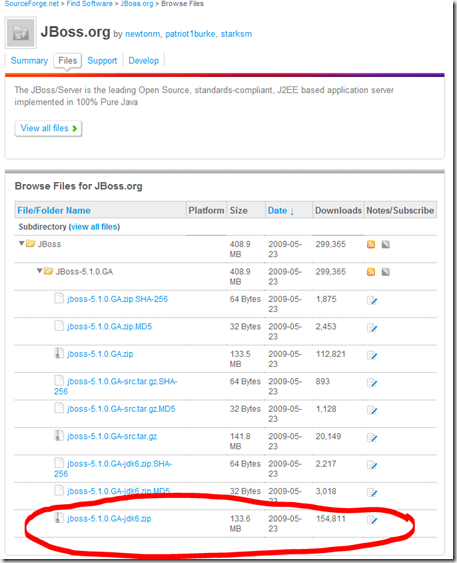
On the next page, we choose the line-5.1.0.GA jboss-jdk6.zip.
Warning ! there are two different versions of JBoss 5.1: a version for jdk 1.5 and a version for jdk 1.6. Do not be fooled!
download starts.
I unzip the downloaded file jboss-5.1.0.GA-jdk6.zip and copy directly under C: \\ so as to have C: \\ jboss-5.1.0.GA.
Changing run.bat
In the directory C: \\ jboss-5.1.0.GA \\ bin I open the file to change run.bat.
was added at the forefront of fighting:
Set JAVA_HOME = C: \\ Program Files \\ Java \\ jdk1.6.0_18
This is a priori the location of your JDK 1.6 64 bit. Windows 7, a 64-bit JDK installed in C: \\ Program Files.
Personally, I do not position the JBOSS_HOME environment variable. Run.bat beats seems to be able to position it properly until we run it since its installation directory.
Reminder folder organization
If you installed JBoss in the directory C: \\ jboss-5.1.0.GA, here's a quick overview of some directories are most important for development.
- C: \\ jboss-5.1.0.GA \\ bin directory that is allowing run.bat start the server
- C: \\ jboss-5.1.0.GA \\ common \\ lib: directory to add a jar that will be common to all applications and all your configurations. That's where we generally added to the jar to access the database.
- C: \\ jboss-5.1.0.GA \\ server \\ default \\ lib: common directory to all your applications configuration "default"
- C: \\ jboss-5.1.0.GA \\ server \\ default \\ tmp: temporary directory that appears to be used by the deployment. It can be safely removed in the development phase. It will be recreated the next startup.
- C: \\ jboss-5.1.0.GA \\ server \\ default \\ log: contains the directory server log when using the configuration "default". The server.log file contains the Log4j log of your application.
- C: \\ jboss-5.1.0.GA \\ server \\ default \\ deploy: deploy directory of your war file for configuration "default". Drag and drop a war file in this directory is the only operation to deploy an application on a JBoss server.
Finally, it remains
- C: \\ jboss-5.1.0.GA \\ lib: which one should not touch. It contains the jar from the server. This directory should be used, should be encouraged (a priori) the C: \\ jboss-5.1.0.GA \\ server \\ default \\ lib which will only affect the default configuration.
Reminder configurations of JBoss
By default, JBoss configurations Book 5:
- all
- default: one that is used when no parameters launches run.bat
-
- minimum standard: the config JBoss JavaEE
- web: it seems to be a lightweight configuration.
Personally I only use default because it seems to contain what I need and has the advantage of being simple to launch.
Test Facility
To start the JBoss server, you double click the bat: run.bat located in C: \\ jboss-5.1.0.GA \\ bin. A message asks you to confirm its execution, it must acquit.
Windows 7 displays an alert firewall: one must accept it.
When the server start is finished, the box displays a command line:
2010-03-05 13:19:49,240 INFO [org.jboss.bootstrap.microcontainer.ServerImpl] (main) JBoss (Microcontainer) [5.1.0.GA (build: SVNTag JBoss_5_1_0_GA = date = 200905221634)] Started in 1m: 7s: 671ms
your JBoss server is running with the default configuration: default.
Type in a browser: http://localhost:8080/
You should see in your browser:

If you click on the link JBoss Web Console, you get a second screen:

In the JVM Hardware you can verify the JVM:
- JVM Name: Java HotSpot (TM) 64-Bit Server VM
This indicates that you are using the 64 bit JDK.
You can also open the Windows Task Manager: Process type and select "Show processes running with Task Manager.
The task manager indicates whether the process java.exe or not 32-bit:
- java.exe * 32: the case of a 32-bit process
- java.exe: if This is a 64 bit process.
To stop the JBoss server, just type Ctrl + C in the DOS console.
Conclusion
The JBoss 5.1 Application to pay particular attention to the JDK used (5 or 6): in relation to the latter it will download the correct zip JBoss.
JBoss is a Java process is used that the JVM will not run or JBoss 5.1 in 32 or 64 bits.
Finally, the installation described in this post is a facility for a developer position: it does not take into account the security issues and will not in any way not visible from another computer. Single run the localhost address (this is the case since at least 4.2).


